
Roundcube Webmail首页的默认样式,有很多用了欧云服务器搭建了邮局的客户,想要修改下为自己喜欢的样子,我们征求大家喜好,做了一些模板,可以复制进去修改下。
要修改的文件为网站根目录下
/skins/elastic/templates/login.html
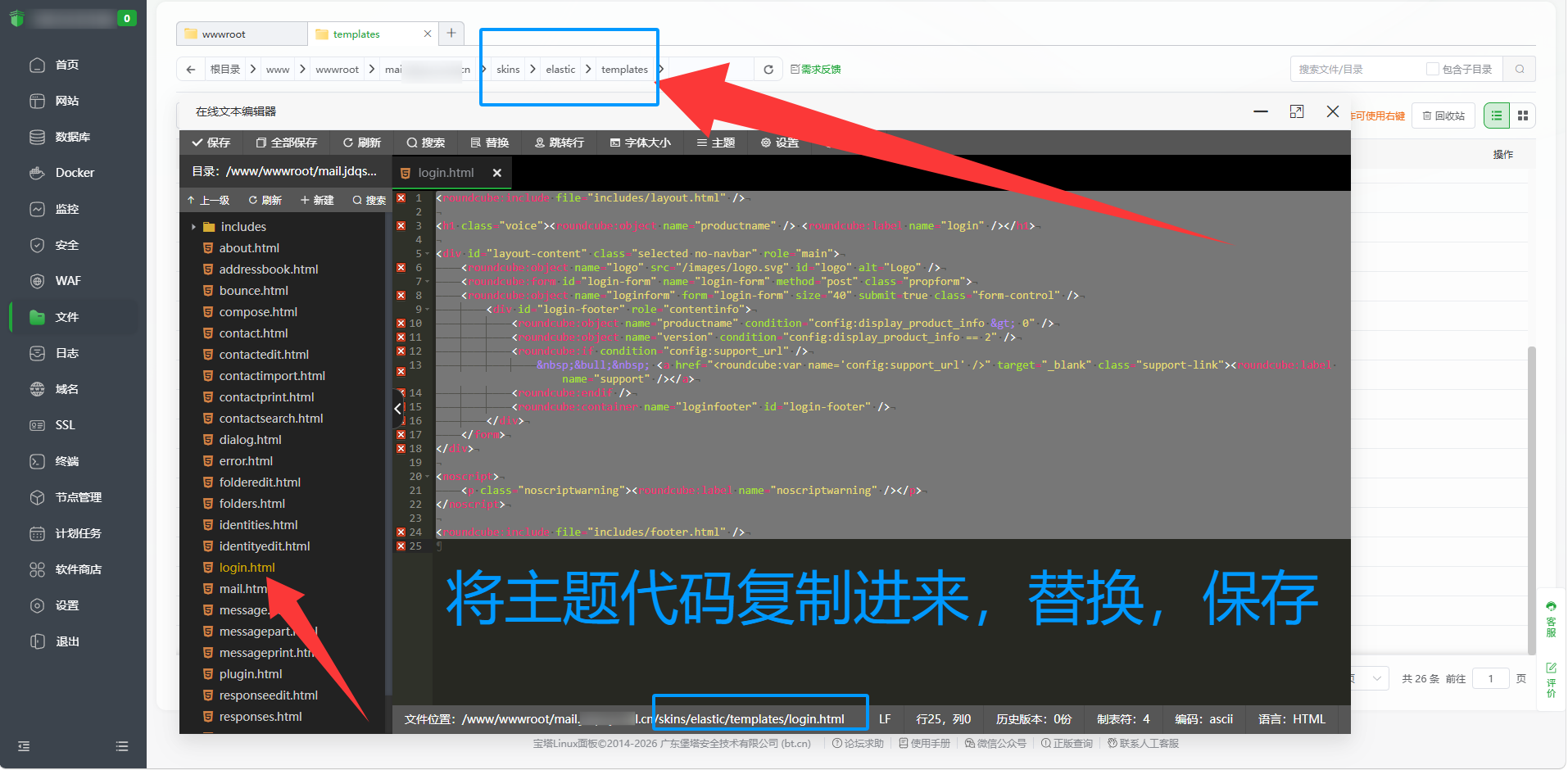
宝塔里双击打开这个文件,直接下面代码复制,全部替换进去,保存就好了。
1、原版默认模板,防止你改了不喜欢,换不回去了
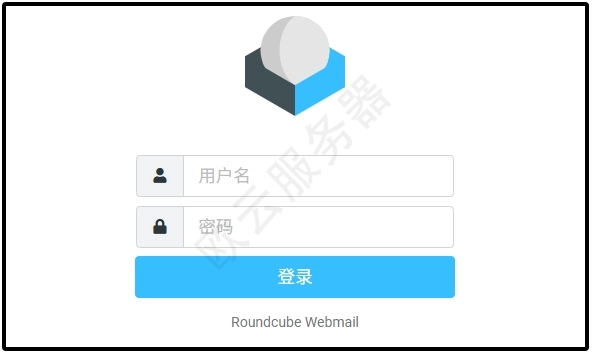
<roundcube:include file="includes/layout.html" /> <h1 class="voice"><roundcube:object name="productname" /> <roundcube:label name="login" /></h1> <div id="layout-content" class="selected no-navbar" role="main"> <roundcube:object name="logo" src="/images/logo.svg" id="logo" alt="Logo" /> <roundcube:form id="login-form" name="login-form" method="post" class="propform"> <roundcube:object name="loginform" form="login-form" size="40" submit=true class="form-control" /> <div id="login-footer" role="contentinfo"> <roundcube:object name="productname" condition="config:display_product_info > 0" /> <roundcube:object name="version" condition="config:display_product_info == 2" /> <roundcube:if condition="config:support_url" /> • <a href="<roundcube:var name='config:support_url' />" target="_blank" class="support-link"><roundcube:label name="support" /></a> <roundcube:endif /> <roundcube:container name="loginfooter" id="login-footer" /> </div> </form> </div> <noscript> <p class="noscriptwarning"><roundcube:label name="noscriptwarning" /></p> </noscript> <roundcube:include file="includes/footer.html" />
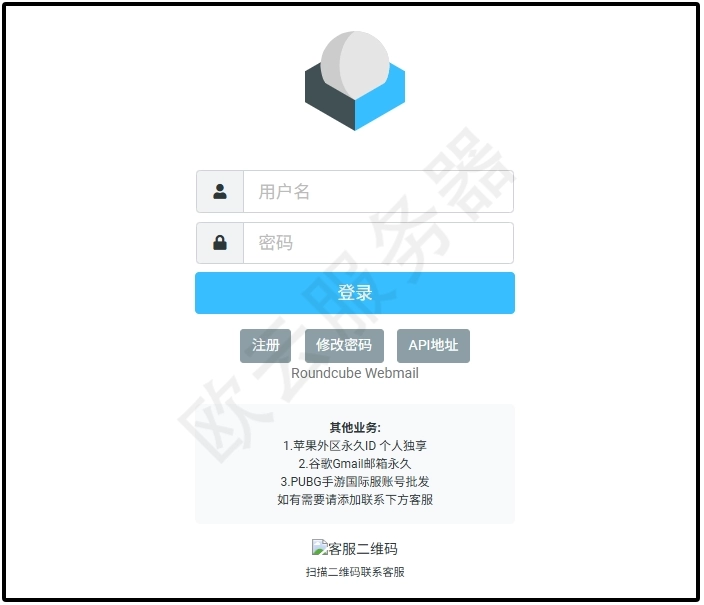
2、带一些按钮的
<roundcube:include file="includes/layout.html" />
<h1 class="voice"><roundcube:object name="productname" /> <roundcube:label name="login" /></h1>
<div id="layout-content" class="selected no-navbar" role="main">
<roundcube:object name="logo" src="/images/logo.svg" id="logo" alt="Logo" style="top: 5vh" />
<roundcube:form id="login-form" name="login-form" method="post" class="propform" style="top: 9vh">
<roundcube:object name="loginform" form="login-form" size="40" submit=true class="form-control" />
<!-- 登录按钮下方的三个功能按钮 -->
<div class="login-buttons" style="margin-top: 15px; text-align: center;">
<button type="button" onclick="alert('注册请联系微信:ycaa1018')" class="button" style="margin: 0 5px;">注册</button>
<button type="button" onclick="alert('当前邮箱不支持修改密码,如需修改密码可联系管理员搭建属于自己的邮箱系统')" class="button" style="margin: 0 5px;">修改密码</button>
<button type="button" onclick="window.location.href='/api'" class="button" style="margin: 0 5px;">API地址</button>
</div>
<div id="login-footer" role="contentinfo">
<roundcube:object name="productname" condition="config:display_product_info > 0" />
<roundcube:object name="version" condition="config:display_product_info == 2" />
<roundcube:if condition="config:support_url" />
• <a href="<roundcube:var name='config:support_url' />" target="_blank" class="support-link"><roundcube:label name="support" /></a>
<roundcube:endif />
<roundcube:container name="loginfooter" id="login-footer" />
</div>
<div class="login-tips" style="margin-top: 20px; padding: 15px; background: #f8f9fa; border-radius: 5px; font-size: 12px; line-height: 1.5;">
<strong>其他业务:</strong><br>
1.苹果外区永久ID 个人独享<br>
2.谷歌Gmail邮箱永久<br>
3.PUBG手游国际服账号批发<br>
如有需要请添加联系下方客服
</div>
<!-- 二维码图片 -->
<div class="qrcode-section" style="margin-top: 15px; text-align: center;">
<img src="/wx.png" alt="客服二维码" style="max-width: 150px; height: auto;">
<p style="font-size: 11px; margin-top: 5px;">扫描二维码联系客服</p>
</div>
</form>
</div>
<noscript>
<p class="noscriptwarning"><roundcube:label name="noscriptwarning" /></p>
</noscript>
<roundcube:include file="includes/footer.html" />
声明:本站所有文章,如无特殊说明或标注,均为本站原创发布。任何个人或组织,在未征得本站同意时,禁止复制、盗用、采集、发布本站内容到任何网站、书籍等各类媒体平台。如若本站内容侵犯了原著者的合法权益,可联系我们进行处理。

评论(0)