
用ritheme主题,有个头疼的是,作者明明做了代码高亮(虽然一般化),但是却不给代码框增加一个复制按钮?
气煞我也,自己动手丰衣足食!!!
找到文件/wp-content/themes/ripro-v5/functions.php
在最后一行,即,这两行代码中间
load_ripto_theme_files( false );

###################################### RITHEME.COM END #########################################
如图所示
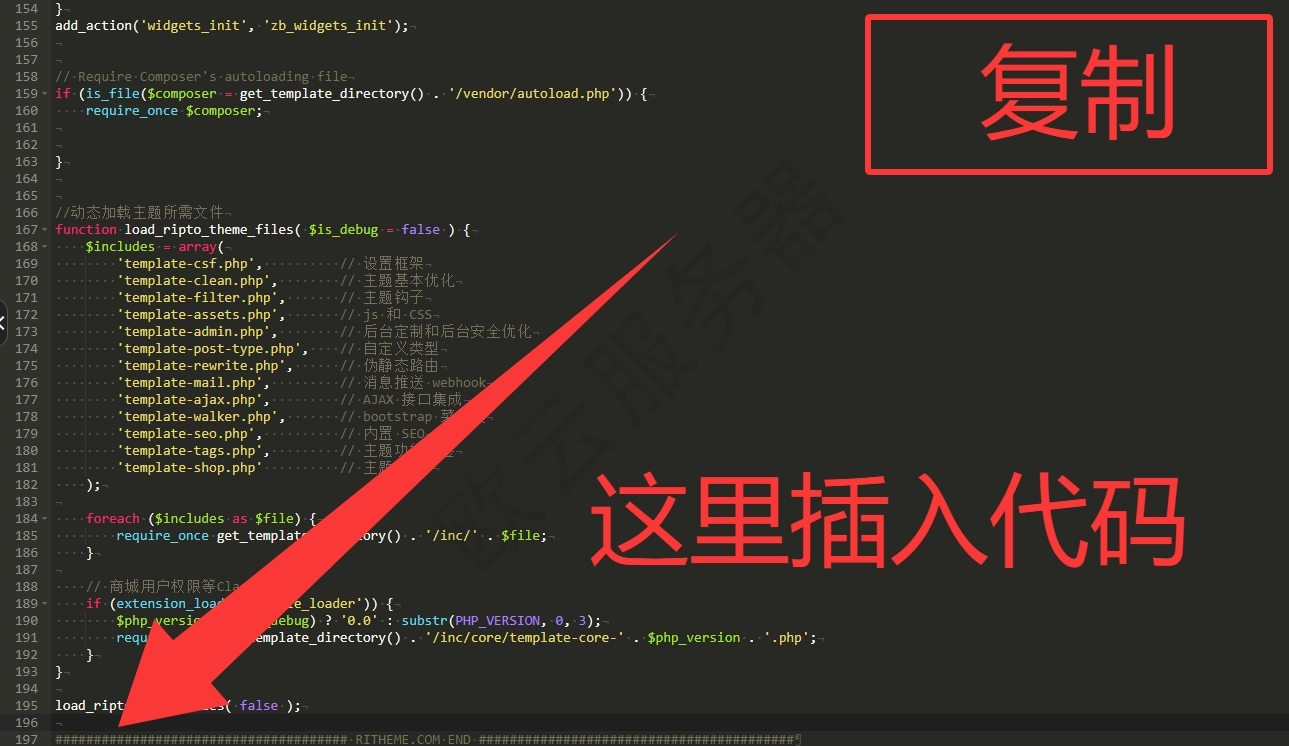
插入下面代码
// 添加代码复制功能
function add_code_copy_function() {
?>
<style>
.code-block-wrapper {
position: relative;
margin-top: 10px;
}
.copy-code-btn {
position: absolute;
top: -30px;
right: 0;
background: rgba(74, 144, 226, 0.9); /* 蓝色背景 */
color: white;
border: none;
padding: 4px 10px;
border-radius: 4px 4px 0 0;
font-size: 12px;
cursor: pointer;
opacity: 1;
transition: all 0.3s ease;
z-index: 10;
font-weight: 500;
backdrop-filter: blur(10px);
-webkit-backdrop-filter: blur(10px);
border: 1px solid rgba(255, 255, 255, 0.1);
border-bottom: none;
box-shadow: 0 -2px 8px rgba(74, 144, 226, 0.2);
}
.copy-code-btn:hover {
background: rgba(74, 144, 226, 1);
box-shadow: 0 -3px 12px rgba(74, 144, 226, 0.3);
}
.copy-code-btn.copied {
background: rgba(108, 117, 125, 0.9); /* 灰色表示复制成功 */
box-shadow: 0 -2px 8px rgba(108, 117, 125, 0.2);
}
.copy-code-btn.copied:hover {
background: rgba(108, 117, 125, 1);
box-shadow: 0 -3px 12px rgba(108, 117, 125, 0.3);
}
/* 移除之前为pre添加的右边距 */
pre {
margin-top: 0 !important;
border-radius: 0 0 4px 4px !important;
}
</style>
<script>
document.addEventListener('DOMContentLoaded', function() {
const codeBlocks = document.querySelectorAll('pre');
codeBlocks.forEach(function(pre) {
// 检查是否已经添加过复制按钮
if (pre.parentNode.classList.contains('code-block-wrapper')) {
return;
}
const wrapper = document.createElement('div');
wrapper.className = 'code-block-wrapper';
const copyBtn = document.createElement('button');
copyBtn.className = 'copy-code-btn';
copyBtn.textContent = '复制';
copyBtn.setAttribute('aria-label', '复制代码');
pre.parentNode.insertBefore(wrapper, pre);
wrapper.appendChild(pre);
wrapper.appendChild(copyBtn);
copyBtn.addEventListener('click', function() {
// 获取原始代码文本,保留所有格式
const code = getOriginalCodeText(pre);
copyToClipboard(code);
const originalText = copyBtn.textContent;
copyBtn.textContent = '已复制';
copyBtn.classList.add('copied');
setTimeout(function() {
copyBtn.textContent = originalText;
copyBtn.classList.remove('copied');
}, 2000);
});
});
// 获取原始代码文本的函数
function getOriginalCodeText(preElement) {
// 方法1: 尝试获取 textContent(保留空白字符)
if (preElement.textContent) {
return preElement.textContent;
}
// 方法2: 如果 textContent 不可用,使用 innerHTML 并清理
let html = preElement.innerHTML;
// 处理 HTML 实体编码
html = html.replace(/</g, '<')
.replace(/>/g, '>')
.replace(/&/g, '&')
.replace(/"/g, '"')
.replace(/'/g, "'")
.replace(/ /g, ' ');
// 移除可能的 span 标签(代码高亮)
html = html.replace(/<span[^>]*>|<\/span>/g, '');
return html;
}
function copyToClipboard(text) {
if (navigator.clipboard && window.isSecureContext) {
navigator.clipboard.writeText(text).then(function() {
console.log('复制成功,格式已保留');
}).catch(function(err) {
console.error('复制失败:', err);
fallbackCopy(text);
});
} else {
fallbackCopy(text);
}
}
function fallbackCopy(text) {
const textArea = document.createElement('textarea');
textArea.value = text;
textArea.style.position = 'fixed';
textArea.style.left = '-9999px';
textArea.style.opacity = '0';
textArea.style.fontFamily = 'monospace'; // 保持等宽字体
textArea.style.whiteSpace = 'pre'; // 保留所有空白字符
document.body.appendChild(textArea);
textArea.select();
try {
document.execCommand('copy');
console.log('复制成功(降级方案),格式已保留');
} catch (err) {
console.error('复制失败:', err);
alert('复制失败,请手动选择文本复制');
}
document.body.removeChild(textArea);
}
});
</script>
<?php
}
add_action('wp_footer', 'add_code_copy_function');
然后你就能拥有和我一样的复制按钮啦,并且这个复制功能没有下面隐患
1、将 TAB 制表符转换为空格
2、合并多个空格
3、丢失某些空白字符
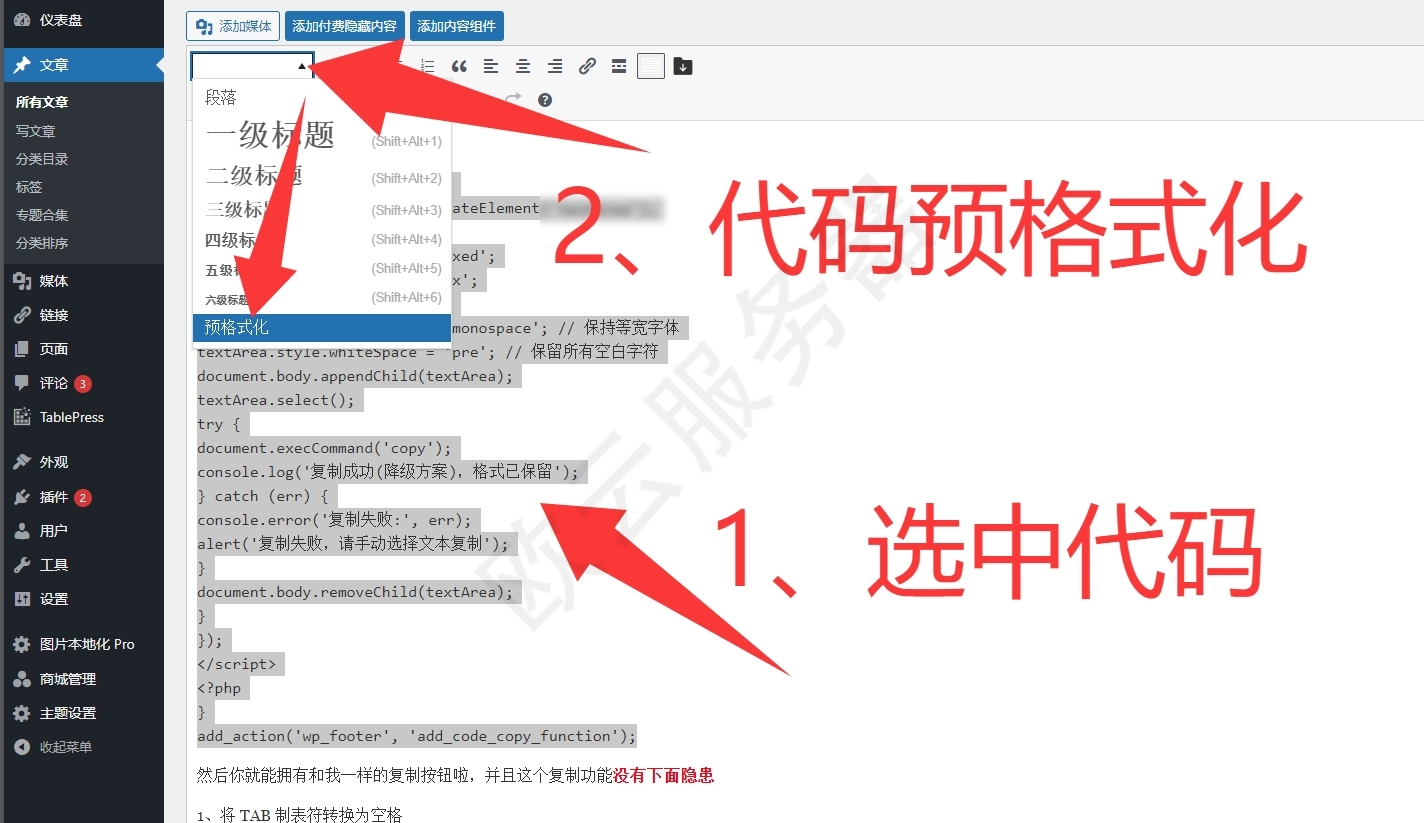
还有人问,日主题怎么设置代码高亮?
只需要选中你的代码,点击左上角【预格式化】就好啦
声明:本站所有文章,如无特殊说明或标注,均为本站原创发布。任何个人或组织,在未征得本站同意时,禁止复制、盗用、采集、发布本站内容到任何网站、书籍等各类媒体平台。如若本站内容侵犯了原著者的合法权益,可联系我们进行处理。

评论(0)